Author Archives: Captain C

The new STYLE_N property

If you’ve ever had to work with the STYLE or STYLE_EX properties in OpenInsight you’ve probably had to write some gnarly code like this to get around the strange way it returns a string containing a C-style hex representation such as “0x8234ABDB”:

style = iconv( get_Property( object, "STYLE" )[3,8], "MX" )

We’ll probably never know the reason the original authors of OpenInsight decided to implement the property like this, but with version 10 we’ve provided a pair of new properties called “STYLE_N” and “STYLE_EX_N” that return the numeric (decimal) representation of a control’s style directly thereby saving the need for the extra parsing.

The LOG_EVENT method

In an earlier post we took a very brief look at some of the new properties of the SYSTEM object, and this time we thought we’d take a closer look at one of it’s new methods called LOG_EVENT.

Simply put the LOG_EVENT method allows you to write a message to the Windows Event Log without the need for you to prototype and use any Windows API functions yourself. It’s very easy to use and takes three arguments:

1) Type Info: This is a dynamic array comprised of the following fields:

   <1> Message Type (Required) : "ERROR", "WARNING" or "INFO".
   <2> Event ID     (Optional) : Integer denoting the event. Defaults to 1.
   <3> Category ID  (Optional) : Integer identifying the category. Defaults to 0.

2) Source Info: This is a dynamic array comprised of the following fields:

   <1> Event Source (Required) : Name of the Event Source (See below).
   <2> Server Name (Optional)  : UNC Name of the system to post the message to.
                                 Defaults to the local workstation.

3) Message Text: This is simply the text of the message to post to the Event Log.

Example: Post an error message to the Event Log from the “RevPS” Event Source:

   x = exec_Method( "SYSTEM", "LOG_EVENT", "ERROR", "RevPS", "FOOBAR!!!!" )

The Event Source name

So far, so good. However if you simply execute the above code you will see the message you posted in the Application Event Log, but you’ll also see that Windows has prefixed your message with some of it’s own text which refers to a missing Event ID description like so:

The reason for this is that Windows expects to find a “registered Event Source” containing the description for the Event ID that you specified.  A registered Event Source is actually a DLL containing a set of strings, each of which corresponds to an Event ID.  Without this DLL you get the warning text you see above which doesn’t look very professional and gives the impression that something is missing from your application.

For OpenInsight v10 we have provided a generic DLL called RevEventMsg.dll that you can register on your system under your desired Event Source name  – if you then use that name in your  call to the LOG_EVENT method you will see your message without any of the warning text prefixed to it.

Registering the DLL is quite simple: you need to create a new key with the name of your Event Source (We used the string “RevPS” for this example) under this path:

HKEY_LOCAL_MACHINE\SYSTEM\CurrentControlSet\services\eventlog\Application\

… and set a couple of values like so (this can be automated easily via a .reg file):
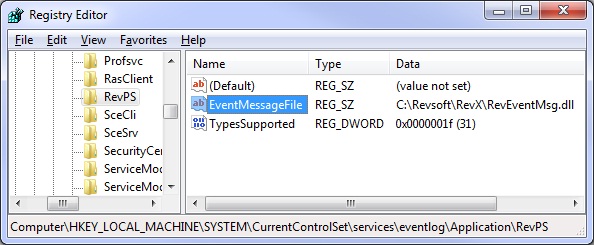
Now if you call the LOG_EVENT method your Event Log entry will look like this:

Much better.

If you are interested in reading further on the subject of the Windows Event Log you can find full documentation on Microsoft’s MSDN website here,

[Edit: 24 Apr 13 – Call_Method renamed to Exec_Method]

(Disclaimer: This article is based on preliminary information and may be subject to change in the final release version of OpenInsight 10).

The Set_Property_Only subroutine

One of the problems with the existing Set_Property function is that it also performs an implicit Get_Property operation to return the previous contents of the property to the caller.  In many cases this information is simply discarded after the “Set” making the “Get” call actually unnecessary, and this inefficiency goes unnoticed as the quantity of information retrieved during the “Get” is small.  However, in some cases the effect is noticeable: For example, setting the ARRAY property of an EditTable that contains several thousand rows to null (i.e. clearing it), will produce a noticeable delay while the ARRAY contents are accessed and returned.

A new subroutine, called Set_Property_Only, has been added to the OpenInsight 10.  This operates in the same way as the existing Set_Property function except for the fact that it doesn’t bother performing a Get_Property operation to return the previous property contents to the caller.  This helps you to optimize your code for better performance.

The new FILESYSTEM object

As we mentioned earlier the decision was taken to deprecate the Utility function, but we still needed to provide the equivalent functionality by some other means. The obvious candidate to update here was the existing SYSTEM object, but rather than overloading it with a whole raft of new members, all of which were filing-system related, we took the decision to create a new object instead, and thus the FILESYSTEM object was born.

The FILESYSTEM object, like the SYSTEM one, is managed internally by the Presentation Server and simply exposes some common Windows Shell directory and file-based functionality to Basic+. As you’ll see below there are some new properties and methods that were not part of the old Utility function, but we’ve also taken the opportunity to enhance some of the existing methods as well – they now hook into the Windows API SHFileOperation function thereby offering better system integration, such as using standard Windows copy/move dialogs and exposing “Undo” functionality.

Here’s a summary of the FILESYSTEM object interface that you’ll find in the new version:

Properties

Property Dev Run Get Set Description
CURRENTDIR X X X Provides access to the current working directory.
DRIVELIST X X Returns a dynamic array of attached drive letters.
FILEOPRESULT X X Returns the most recent result code from a FILESYSTEM object method call.
SYSTEMDIR X X Returns the OS System directory.
TEMPDIR X X Returns the user’s Temp directory.
WINDOWSDIR X X Returns the Windows directory.

Methods

Method Description
COPYDIR Copies an entire directory and sub-directories to a new location.
COPYFILES Copies one or more files to a new location.
DELETEFILES Deletes one or more files.
DIREXISTS Checks to see if a directory exists.
FILEEXISTS Checks to see if a file exists.
GETABSOLUTEPATH Returns an absolute path from a relative path
GETLONGPATH Converts a short path to its long path form
GETRELATIVEPATH Returns a relative path from an absolute path
GETSHORTPATH Converts a long path to its short path (i.e. MS-DOS “8.3”) form
GETSPECIALDIR Returns the path to a “special” OS folder such as “My Documents”, AppData and so on.
MAKEDIR Creates a directory or nested directory path.
MOVEDIR Moves an entire directory and sub-directories to a new location.
MOVEFILES Moves one or more files to a new location.
REMOVEDIR Removes a directory.
RENAMEDIR Renames a directory.
RENAMEFILE Renames a file.

Of course this is probably not a final list, so please feel free to leave us a comment if you think of anything that would make a good addition here.

The SYSTEM object – some new properties

As the project moves along and work progresses you should see many new items added to the object interfaces in the Presentation Server. One of the main reasons for this is to try and reduce the amount of times you as a developer have to call the Windows API directly – we realize that most OI programmers aren’t C programmers and so we’re trying to save you the pain of dealing with static data types, C-structures and pointers wherever possible.

In light of this we’ve made some changes to the SYSTEM object: As well as bringing across many of the existing Utility services (mentioned previously here) there’s also some brand-new properties and methods too (and we’re not finished yet).

Here’s a quick look at some of the new SYSTEM properties we’ve added so far:

DPI property

This property returns the Windows DPI setting (96, 120 or 144) so you can handle custom scaling in your app if it’s running at a different DPI than the system you designed it on.

ENVVARLIST property

This property returns a list of OS environment variables (just as if you’d typed “set” at the DOS command prompt).

FONTLIST property

This property returns a list of font names that are available on the system.

INTERACTIVE property

This property returns TRUE$ if OpenInsight has been launched in an interactive Windows session (i.e. it has a “desktop”).  It returns FALSE$ if OpenInsight has been launched in a non-interactive session such as from a Windows Service process.

MONITORLIST property

This property returns a dynamic array of monitor information.  Each field in the array contains the following details for each monitor:

  • Monitor Handle
  • Monitor rectangle (left, top, right, bottom)
  • Monitor work area (left, top, right, bottom)
  • Flags
  • Device name.

TYPES property

This property returns a list of the object types that the Presentation Server supports (EDITBOX, LISTBOX, WINDOW and so on).  We’ll cover this in more detail in a later post when we look at some of the properties that expose an object’s type-information to provide a “reflection” interface for the toolset.

That’s just a few of the new additions – we’ll post more as they appear.  If there’s any others you think should be added please leave a comment and tell us.

The Utility function

In our previous Send_Message posting we mentioned that we had deprecated another well-known function, and I’m sure you can guess which one from the title of this post – Yep, we deprecated the Utility function!

One of the things we’ve tried to do in this release is to tidy up and standardize the interface between your Basic+ programs and the Presentation Server, providing a standard object-based model based on properties, methods and events.  The Utility function has always been been an exception to this however, essentially providing a shorthand way of executing what should be SYSTEM object methods, thereby breaking the paradigm.

In light of this the Utility function has been deprecated and it’s functionally exposed as properties and methods of the SYSTEM and FILESYSTEM objects instead.  Utility itself still works, but it is now a shell that maps to the two aforementioned objects (more of which we’ll cover later).

In case you’re interested here’s how the Utility services map to the SYSTEM and FILESYSTEM objects:

Utility Service Object Type
BEEP SYSTEM Method
COPYFILE FILESYSTEM Method
CREATE SYSTEM Method
CURSOR SYSTEM Property [S]
CHOOSECOLOR SYSTEM Method
CHOOSEFONT SYSTEM Method
CHOOSEFILE SYSTEM + FILESYSTEM Method
CHOOSEDIR SYSTEM + FILESYSTEM Method
DESTROY           SYSTEM Method
DIALOG_BOX        SYSTEM Method
FLUSH SYSTEM Method
GET_EVENT SYSTEM Method
GETLOGICALDRIVES FILESYSTEM Property [G] (DRIVELIST)
HANDLE_BY_CURSOR  SYSTEM Method
HOOKCTRL          SYSTEM Method
IUNKNOWN_RELEASE  SYSTEM Method
LOAD_PICTURE      SYSTEM Method
MAKEDIR           FILESYSTEM Method
OBJECTID          SYSTEM Method
OPENAPP           SYSTEM Method
OBJECT_BY_CURSOR  SYSTEM Method
OBJECTLIST SYSTEM Method
PRINTSETUP SYSTEM Method
POST_WINMSG       SYSTEM Method
PICTURE_PROPS     SYSTEM Method
REMOVEDIR FILESYSTEM Method
RENAMEDIR FILESYSTEM Method
RENAMEFILE FILESYSTEM Method
RUN SYSTEM Method
RUNHELP           SYSTEM Method
RUNWIN SYSTEM Method
SHELLEXECUTE SYSTEM Method
SEND_WINMSG SYSTEM Method
TEXTRECT SYSTEM Method
UNHOOKCTRL SYSTEM Method
WINCOUNT SYSTEM Property [G]
WINDOW_BY_POS     SYSTEM Method

[EDIT: 19 Nov 15, Updated CHOOSEDIR and CHOOSEFILE methods to include FILESYSTEM]

(Disclaimer: This article is based on preliminary information and may be subject to change in the final release version of OpenInsight 10).

Send_Message and Exec_Method

OK, so we deprecated the Send_Message function for OI 10…

… but before you worry about your apps being broken don’t despair because it still works as it ever has.  It has actually been replaced by a new function named Exec_Method which exposes the same interface as Send_Message, with the added bonus that it can support more than four parameters, so it’s basically a straight drop-in replacement when you need to use it.

Why did we do this?  Well, there’s a couple of reasons really:

  • When talking about object-based systems the usual jargon includes references to properties, methods and events. However, with OI we’ve always used the term “messages” when referring to an object’s methods because of the Send_Message function.  We thought it was about time to use more standard terminology, like we do with the Basic+ OleExecMethod function for example.
  • Send_Message is very close to the name of the core Windows API SendMessage function and sometimes it’s just too confusing (and annoying) trying to explain which one you actually mean when you’re discussing how to manipulate an object.

Actually Send_Message isn’t the only casualty, we’ve deprecated another well-known function too, but we’ll leave the details of that one for another post…

[Edit: 24 Apr 13 – Call_Method renamed to Exec_Method]

Welcome…

… to the “Building OpenInsight 10” blog. As work progresses on the next version of OpenInsight this is where you’ll find the latest news and information on some of the new features and changes to the product taking place during the development process.

Right now work is well underway on the new Presentation Server (RevPS) so we’ll be taking a look at that in the coming months. Just to whet your appetite here’s a few things that we’re working on for version 10:

  • 64-bit version
  • High DPI aware
  • Full Windows Common Control support
  • Improved Edit Table
  • Some new controls (e.g. Panel, Property Grid)
  • Improved OLE support
  • Non visual object support (e.g. HTTP clients and servers)
  • Extensible architecture

Of course there’s more, but if we told you everything here there’d be nothing to cover at next year’s conference in Nashville!

Anyway, we’ll try and make regular postings but there’s still a lot of work to do before release, so if you don’t see a post for a week or two it’s not because we’ve given up – it’s because we’re really really really busy.