Author: Bob Carten
Categories: Advanced Integration, Basic+, PowerShell, REST API, JSON Architecture
As corporate ecosystems grow, the need to bridge OpenInsight applications with modern, third-party web services becomes inevitable. In the Revelation Software OpenInsight world, we face a choice: do we try to manage complex HTTP protocols, certificate handshakes, and raw multi-part binary streaming natively in Basic+, or do we lean into modern execution pipelines?
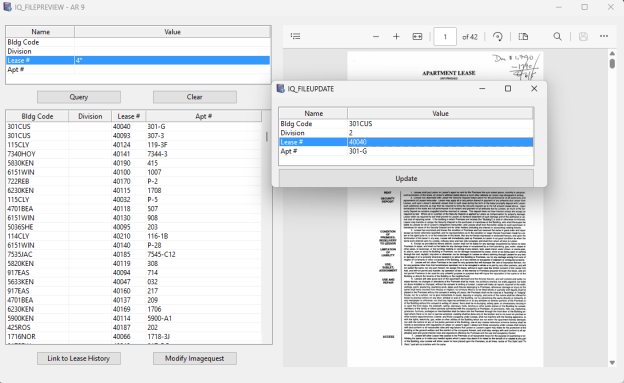
Recently, while modernizing an OpenInsight 10 document management workflow to sync index data with an external ImageQuest REST API, I developed a hybrid architecture that leverages the native strengths of OpenInsight, Basic+ RTI_JSONX, and Windows PowerShell runspaces via rti_powerscript.
This article walks through that design pattern in full — covering the exact traps you will hit around unmanaged memory management, .NET model binding validation, certificate enforcement, and multipart binary upload — and how to solve them for production-grade reliability.
The Architecture Overview
The most significant architectural trap when integrating an OpenInsight 10 application with a strict .NET-backed REST API is treating updates as simple PATCH statements. Many modern document management APIs enforce full object graphs during a PUT request. If you send only the properties modified in your UI window, the server-side model binder encounters a NullReferenceException on missing tracking fields (internal IDs, system creation timestamps, hidden file references) and crashes with a 500 Server Error.
To keep OpenInsight completely insulated from needing to know or track hidden system-level fields, the solution is a clean separation of concerns using a Read-Modify-Write cycle:
- OpenInsight Form: Collects user-edited criteria inside an Edit Table grid.
- Basic+ (
RTI_JSONX): Translates internal OpenInsight delimiters (@FMand@VM) cleanly into a structured JSON string, escaping text variables natively and protecting data boundaries. - PowerShell Engine via
rti_powerscript: Authenticates via an OAuth2 token endpoint, fetches the absolute fresh master copy of the record from the server, merges the OpenInsight delta JSON string in memory, and submits a 100% compliant payload graph back to the network.
The result: OpenInsight never touches HTTP. PowerShell never parses OpenInsight delimiters. Each layer does only what it does best.
Step 1: The Basic+ Serialization Pipeline
When preparing data for a REST API, performing the transform in Basic+ via RTI_JSONX is vastly superior to doing text-splitting inside a PowerShell script. OpenInsight natively handles its own delimiters; passing a raw matrix to the OS layer is incredibly fragile if a user types a character that collides with an internal separator.
The following snippet shows how to iterate through an Edit Table array, build individual key/value JSON objects, append them into a root array container, and properly manage unmanaged heap pointers.
* =============================================================================* Routine: Form Event Handler (e.g., BTN_UPDATE Click)* Purpose: Extract Edit Table grid edits and serialize to valid JSON* =============================================================================docId = @atWindow->udp_DocId$modified_Array = .ET_Metadata->Array* Safely append the active context module without using dangerous <-1> indicatorsnextCol = FieldCount(modified_Array<1>, @VM) + 1modified_Array<1, nextCol> = 'Document Type'modified_Array<2, nextCol> = @atWindow->udp_CurrentModule$* 1. Initialize a new root JSON Array pointer handlehJsonArray = rti_jsonx(null$, "NEW", "ARRAY")* 2. Loop through the metadata row entriesnumRows = nextColFor r = 1 To numRows attrName = modified_Array<1, r> attrValue = modified_Array<2, r> If attrName != "" Then hPairObj = rti_jsonx(null$, "NEW", "OBJECT") Call rti_jsonx(hPairObj, "SETVALUE", "name", attrName, "STRING") Call rti_jsonx(hPairObj, "SETVALUE", "value", attrValue, "STRING") * Method 16 = RJSON_MTD_APPENDITEM$ -- array append does NOT go through rti_jsonx Call rti_rjson(16, hJsonArray, "", hPairObj) * CRITICAL: Free the child immediately -- parent now holds the reference Call rti_jsonx(hPairObj, "FREE") EndNext r* 3. Serialize the object graph to a flat text stringjsonString = rti_jsonx(hJsonArray, "STRINGIFY")* 4. Free the parent array handleCall rti_jsonx(hJsonArray, "FREE")* 5. Hand the payload to the REST interfaceresponse = IQREST_INTERFACE('MODIFY', docId, jsonString)
A few things are worth mentioning:
- Array append does not go through
rti_jsonx. You must callrti_rjson(16, hParent, "", hChild)directly. This is the raw method number forRJSON_MTD_APPENDITEM$inside RevJSON.dll. - Free the child immediately after appending. The parent array now holds the only live reference. Holding the child handle is not just unnecessary — it is a leak that compounds in loops.
- Free the parent after STRINGIFY. The serialized string is a normal Basic+ variable. Once you have it, the handle has no further purpose.
- Memory Managment is an oi10 requirement. OpenInsight 11 has a native Json type which manages the memory for you.
Step 2: Storing the PowerShell Module in the OI Repository
Note that the PowerShell module lives entirely inside the OpenInsight repository. There is no separate .psm1 file to deploy, version, or synchronize. Because this was an OpenInsight 10 project, the module is stored in an OI Insert record using a wrapper which the OI compiler silently ignores at compile time but that is readable at runtime.
Compile Insert IQREST_UTILS_PSM#IFDEF IGNORE_ME# PowerShell module begins here -- lines starting with # are PS commentsfunction Get-IQToken { param([string]$BaseUrl, [string]$Username, [string]$Password) $body = @{ username = $Username; password = $Password } $resp = Invoke-RestMethod -Uri "$BaseUrl/api/token" -Method Post -Body $body return $resp.access_token}function Get-IQDocument { param([string]$BaseUrl, [string]$Token, [string]$DocId) $headers = @{ Authorization = "Bearer $Token" } return Invoke-RestMethod -Uri "$BaseUrl/api/documents/$DocId" -Method Get -Headers $headers}function Update-IQMetadata { param([string]$BaseUrl, [string]$Token, [string]$DocId, [string]$DeltaJson) # Step 1: Read-Modify-Write -- fetch the complete document graph first $doc = Get-IQDocument -BaseUrl $BaseUrl -Token $Token -DocId $DocId $delta = ConvertFrom-Json $DeltaJson # Step 2: Merge the delta attributes sent from OpenInsight foreach ($pair in $delta) { $existing = $doc.Attributes | Where-Object { $_.name -eq $pair.name } if ($existing) { $existing.value = $pair.value } else { $doc.Attributes += [PSCustomObject]@{ name = $pair.name; value = $pair.value } } } # Step 3: PUT the complete, merged object graph back $headers = @{ Authorization = "Bearer $Token"; "Content-Type" = "application/json" } $body = $doc | ConvertTo-Json -Depth 10 Invoke-RestMethod -Uri "$BaseUrl/api/documents/$DocId" -Method Put ` -Headers $headers -Body $body Write-Output "UPDATE_STATUS:SUCCESS"}#ENDIF
At runtime, the calling Basic+ routine reads the insert record and strips the OI framing before passing it to rti_powerscript:
* Read the insert record from the repositoryCall Repository("ACCESS", repoRow, "STPROCINS", "IQREST_UTILS_PSM", "", "", "", sErr)insertText = repoRow<2>* Strip everything before the first # to remove the OI compiler wrapperpsModule = insertText[Index(insertText, '#', 1), Len(insertText)]
This approach has significant operational benefits: the PowerShell code travels with your OI application export, is subject to the same source control workflow, and requires zero additional deployment steps on a new workstation.
Step 3: The PowerShell Communication Engine
rti_powerscript hosts a PowerShell runspace in-process via OI’s .NET bridge. It requires System.Management.Automation.dll in the OI client files directory — the same assembly used by PowerShell itself. Once that assembly is present, no other installation is required.
The calling pattern from the IQREST_INTERFACE subroutine looks like this:
Declare Function rti_powerscript* Build the complete script: load the module, then call the functionpsScript = psModule : @fmpsScript := "$baseUrl = '" : baseUrl : "'" : @fmpsScript := "$token = Get-IQToken -BaseUrl $baseUrl -Username '" : user : "' -Password '" : pass : "'" : @fmpsScript := "Update-IQMetadata -BaseUrl $baseUrl -Token $token -DocId '" : docId : "' -DeltaJson '" : jsonString : "'"* Execute -- pipeline is single-use, must CLEAR before running another scriptscriptHandle = rti_powerscript("ADDSCRIPT", psScript)results = rti_powerscript("RUNCOMMAND", scriptHandle)status = results<1>dummy = rti_powerscript("CLEAR")* Check resultIf status == "UPDATE_STATUS:SUCCESS" Then Msg(@window, "Document updated successfully.")End Else errMsg = Field(status, ":", 3) Msg(@window, errMsg)End
Key behaviors to understand:
- Default runspace auto-initializes. You do not need to call
CREATERUNSPACEfor typical single-shot scripts. The runspace persists in a named common block between calls. - Pipelines are single-use. After
RUNCOMMAND, you must callCLEARbefore running another script. Forgetting this causes the second call to fail silently. - Each
Write-Outputline becomes one field. RUNCOMMAND returns results as an@FM-delimited string whereresults<1>is the first output line,results<2>is the second, and so on. CRLF within a line is converted to@VM. - Result tokens are explicit contracts. By convention, the first
Write-Outputline is a status token likeUPDATE_STATUS:SUCCESSorUPDATE_STATUS:ERROR:message text. Basic+ checks this token and reacts accordingly. This keeps error handling clean on both sides of the boundary.
Step 4: Handling Real-World Network Constraints
In most enterprise environments, you will immediately run into TLS certificate validation failures against internal servers running self-signed or private CA certificates. Rather than deploying certificates to every workstation, the cleanest approach for an internal integration is a targeted TLS bypass scoped to the specific request:
# At the top of the PowerShell module, before any Invoke-RestMethod calls:[System.Net.ServicePointManager]::ServerCertificateValidationCallback = { $true }[System.Net.ServicePointManager]::SecurityProtocol = ` [System.Net.SecurityProtocolType]::Tls12 -bor ` [System.Net.SecurityProtocolType]::Tls13
The TLS12/TLS13 enforcement is equally important. Older .NET framework versions default to TLS 1.0, which most modern servers now reject outright.
Multipart File Upload
The one area where Invoke-RestMethod falls short is multipart/form-data uploads where the boundary must be precisely controlled and binary content must be included alongside metadata fields. For Add-IQDocument, we dropped down to System.Net.HttpWebRequest directly:
function Add-IQDocument { param([string]$BaseUrl, [string]$Token, [string]$FilePath, [string]$MetaJson) $boundary = [System.Guid]::NewGuid().ToString() $url = "$BaseUrl/api/documents" $req = [System.Net.HttpWebRequest]::Create($url) $req.Method = "POST" $req.Headers.Add("Authorization", "Bearer $Token") $req.ContentType = "multipart/form-data; boundary=$boundary" $bodyStream = New-Object System.IO.MemoryStream # Metadata part $metaPart = "--$boundary`r`nContent-Disposition: form-data; name=`"metadata`"`r`n`r`n$MetaJson`r`n" $metaBytes = [System.Text.Encoding]::UTF8.GetBytes($metaPart) $bodyStream.Write($metaBytes, 0, $metaBytes.Length) # File part $fileName = [System.IO.Path]::GetFileName($FilePath) $filePart = "--$boundary`r`nContent-Disposition: form-data; name=`"file`"; filename=`"$fileName`"`r`nContent-Type: application/octet-stream`r`n`r`n" $fileBytes = [System.Text.Encoding]::UTF8.GetBytes($filePart) $bodyStream.Write($fileBytes, 0, $fileBytes.Length) $fileData = [System.IO.File]::ReadAllBytes($FilePath) $bodyStream.Write($fileData, 0, $fileData.Length) $closing = "`r`n--$boundary--`r`n" $closingBytes = [System.Text.Encoding]::UTF8.GetBytes($closing) $bodyStream.Write($closingBytes, 0, $closingBytes.Length) $req.ContentLength = $bodyStream.Length $bodyStream.Position = 0 $bodyStream.CopyTo($req.GetRequestStream()) $resp = $req.GetResponse() Write-Output "ADD_STATUS:SUCCESS"}
This gives you byte-perfect control over the multipart boundary, content-type headers, and binary encoding — something Invoke-RestMethod -Form cannot reliably deliver across all PowerShell versions.
Why This Architecture Works
After working through this integration, the design philosophy is clear and reusable for any REST API target:
| Concern | Handled by | Why it belongs there |
|---|---|---|
| UI state, user input, OI delimiters | Basic+ / RTI_JSONX | OI knows its own data model; JSON escaping is handled natively |
| HTTP, TLS, OAuth2, multipart | PowerShell | Modern .NET stack; no native support needed in Basic+ |
| Server-side model graph integrity | PowerShell Read-Modify-Write | Fetching fresh state before PUT avoids all partial-update 500 errors |
| Module deployment | OI Insert + #IFDEF IGNORE_ME | PowerShell travels with the OI app; no separate file management |
| Result communication | Write-Output token protocol | Clean contract; Basic+ reads results<1> without parsing raw HTTP |
The #IFDEF IGNORE_ME insert pattern for storing PowerShell modules is particularly worth highlighting. It means your PowerShell is versioned in the OI repository, exported with your application, and deployed with zero extra steps. This pattern works well for OpenInsight 10, but it overloads the functionality of inserts. We expect that interacting with external agents will be a common requirement in the future, so in OpenInsight version 11 we intend to add a powerscript document type, as well as python, JavaScript and other common scripting languages supported by the new Revelation application server (RevAS). That is a topic for future articles.
For any integration project that involves a .NET-modeled API, certificate-sensitive endpoints, or binary file transfer, this three-layer pattern — Basic+ for data, RTI_JSONX for serialization, PowerShell for the network — is a solid approach for a production-reliable result. We intend that OpenInsight 11 will make using this pattern even easier.